


Polymarket US Deposit Guide: How to Deposit Money in the United States
Polymarket US deposit guide explains how to deposit money on Polymarket in the US using a crypto-based system instead of traditional payment methods. This polymarket deposit guide for beginners covers how to deposit on Polymarket in the US through a crypto deposit using USDC, along with the required wallet connection. Unlike bank transfers or cards, Polymarket operates fully on blockchain infrastructure, meaning users must understand how deposits work before getting started.
For users interested in prediction market funding, learning how to fund a Polymarket account US is essential. Deposits are processed through on-chain transactions, requiring proper wallet setup and preparation. Many users rely on Bitget Wallet to manage assets and simplify the entire deposit process, including handling USDC deposits and wallet interactions, making it a practical polymarket deposit guide for beginners entering the platform.
Key Takeaways
- Polymarket deposits require USDC and a crypto wallet, not fiat payment methods. This means every polymarket deposit must be completed as a crypto transaction rather than through traditional banking systems.
- Users must complete wallet setup and follow a step-by-step polymarket deposit process, making this a practical polymarket deposit guide for beginners who want to understand how to deposit on Polymarket in the US.
- Deposits are processed as on-chain transactions, with network fees affecting execution. Each on-chain deposit requires confirmation and may vary depending on blockchain conditions and gas fees.
Can You Deposit Money on Polymarket in the United States?
Polymarket US users deposit functionality depends on how the platform operates within a decentralized framework. While users in the United States can access the platform, understanding eligibility and restrictions is essential before attempting to fund an account.
Can US Users Access and Use Polymarket?
Polymarket US users deposit access exists, but availability may depend on individual responsibility and how users interact with the platform. As a decentralized system, Polymarket does not function like traditional financial services, so users must evaluate their own access conditions.
- Access may vary depending on how users interact with decentralized platforms
- Polymarket US users deposit activity is not structured like traditional financial onboarding
- Users are responsible for understanding how deposits work before proceeding
What Restrictions Apply to Polymarket Deposits in the US?
When considering how to fund a Polymarket account US, users should be aware that restrictions may apply depending on jurisdiction and compliance expectations. It is important to understand these considerations before making a polymarket deposit.
- Regulations may affect how to fund a Polymarket account US
- Certain features or access conditions may vary by region
- Users should review all requirements before making a polymarket deposit
How to Deposit Money on Polymarket in the United States
To understand how to deposit on Polymarket, users need to follow a structured process that involves wallet setup, funding with USDC, and confirming an on-chain deposit. This step-by-step polymarket deposit process ensures that funds are securely transferred and ready for use.
Step-by-Step Polymarket Deposit Process
The process of how to deposit on Polymarket in the US involves connecting a wallet, adding USDC funds, and completing a blockchain transaction. Using Bitget Wallet simplifies this flow by providing a more direct and seamless way to manage funds, complete wallet connection, and execute deposits efficiently.
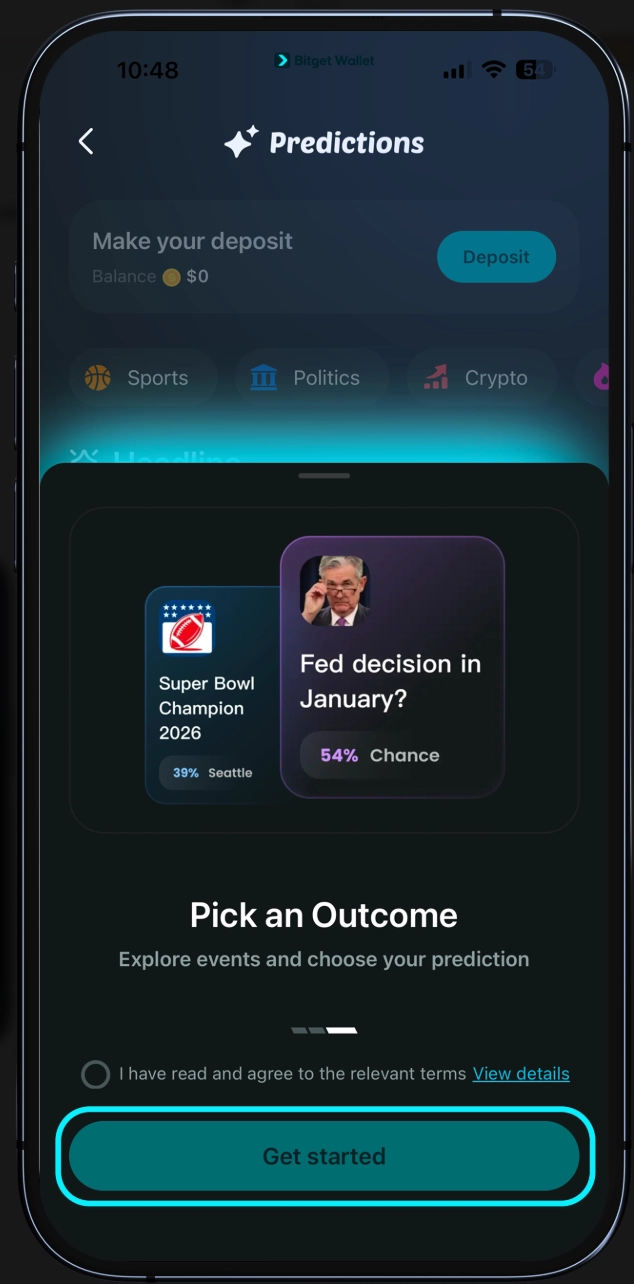
Step 1 – Complete Polymarket Wallet Setup
Start by completing polymarket wallet setup using Bitget Wallet, which allows a seamless wallet connection to Polymarket. A USDC wallet is required to manage funds and prepare for deposits.
Download Bitget Wallet to get started.
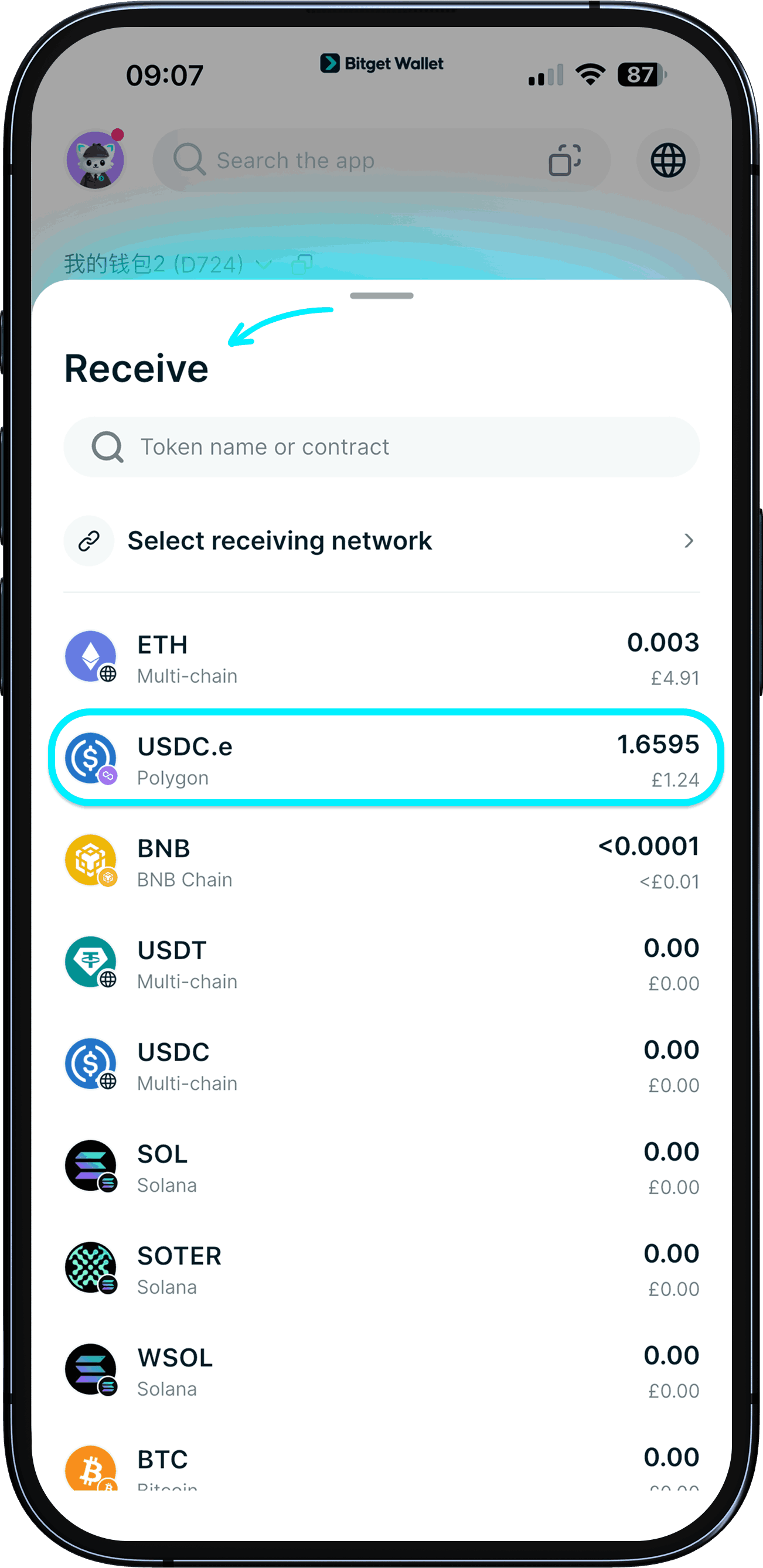
Step 2 – Add Funds Using a USDC Wallet
Next, perform a polymarket USDC deposit by adding funds to your wallet. This crypto deposit ensures you have sufficient USDC available for transactions.
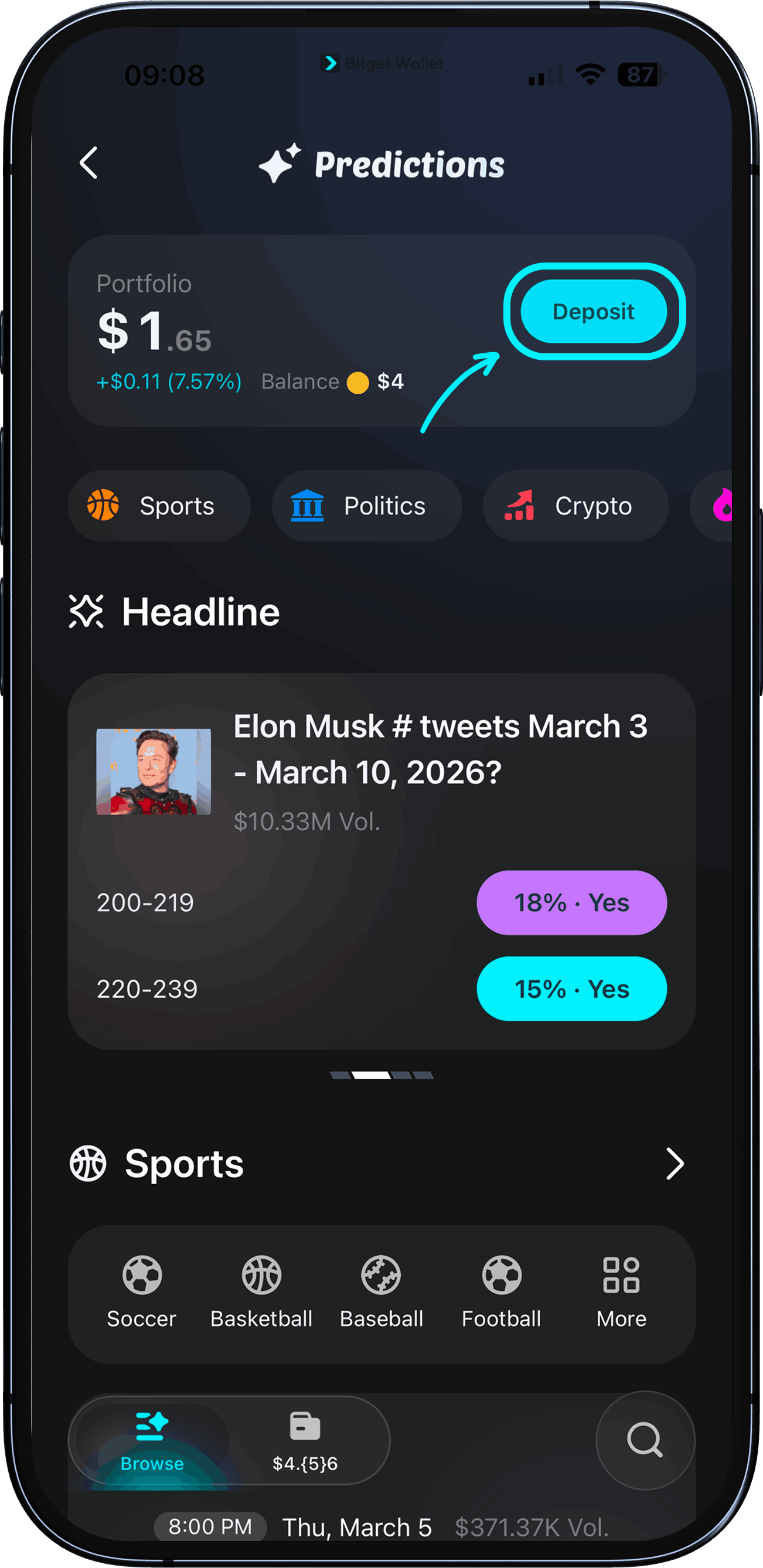
Step 3 – Deposit Funds into Polymarket
Initiate the polymarket deposit by transferring funds from your wallet into the platform. This is completed as an on-chain deposit and requires confirmation through the blockchain network.
Step 4 – Confirm Transaction and Start Trading
After confirmation, funds will be available for prediction market funding, completing the process of how to deposit on Polymarket in the US.
What Do You Need Before Depositing Money on Polymarket?
Before starting a polymarket deposit, users must ensure that their wallet is properly set up, funded with USDC, and ready to handle blockchain transactions. Preparing these elements helps avoid delays and errors during the deposit process.
Polymarket Wallet Setup Using Bitget Wallet
A complete polymarket wallet setup is required before depositing. Bitget Wallet provides a simple way to handle wallet connection and manage assets needed for deposits.
- Set up Bitget Wallet before initiating any polymarket deposit
- Ensure wallet connection is active and properly configured
- Use the wallet to manage assets and interact with Polymarket
USDC Wallet and Funding Requirements
Users must hold USDC in a compatible USDC wallet before making a polymarket USDC deposit. Without sufficient funds, the deposit process cannot proceed.
- Ensure enough USDC is available for the polymarket USDC deposit
- Verify the correct wallet address before transferring funds
- Confirm funds are visible in your USDC wallet before depositing
Gas Fees and On-Chain Deposit Requirements
Every on-chain deposit requires gas fees, which vary depending on network conditions. Ensuring sufficient balance for fees is critical for successful transactions.
- Prepare extra balance to cover gas fees for each on-chain deposit
- Monitor network congestion, which can increase costs
- Avoid failed transactions by ensuring sufficient funds for fees
What Are the Polymarket Deposit Methods for US Users?
Polymarket deposit methods are based on crypto infrastructure, meaning users fund accounts through wallets and blockchain transactions instead of traditional payments. Understanding polymarket deposit methods allows users to choose the most efficient way to fund their account.
1. Deposit Using a Crypto Wallet Transfer
One of the main polymarket deposit methods is transferring funds directly from a crypto wallet after completing a wallet connection. Using Bitget Wallet helps simplify this process by providing a more direct way to manage assets and execute deposits.
- Transfer funds from your wallet to Polymarket
- Use Bitget Wallet to streamline the wallet connection
- Verify the correct wallet address before confirming
2. Deposit Using USDC Stablecoin
The most common method is a polymarket USDC deposit, as USDC is the standard asset used for funding accounts. Users must ensure their USDC wallet has sufficient balance before initiating the deposit.
- Use USDC as the primary asset for funding
- Ensure sufficient balance before depositing
- Confirm your USDC wallet is connected
3. Deposit Through On-Chain Crypto Transactions
All deposits are processed as a crypto deposit through blockchain, meaning each transaction is an on-chain deposit. Users must confirm transactions and account for gas fees to ensure successful execution.
- Confirm transactions on the blockchain
- Monitor network conditions for delays
- Ensure sufficient gas fees
Polymarket Deposit Fees and Costs in the United States
Polymarket deposit fees and costs are mainly determined by blockchain activity rather than fixed platform charges. Since every polymarket deposit is processed as an on-chain deposit, users must account for gas fees, transaction costs, and potential wallet-related charges when funding their accounts. Understanding how these costs work helps users avoid failed transactions and manage expenses more efficiently when making a crypto deposit.
Network Fees and Gas Costs for Polymarket Deposits
Each on-chain deposit requires gas fees, which can vary depending on network congestion. These fees are the primary cost associated with a polymarket deposit.
- Gas fees are required for every on-chain deposit
- Costs increase during periods of high network activity
- Fees must be paid in the native network token
Transaction Costs When Making a Crypto Deposit on Polymarket
In addition to gas fees, crypto deposit transactions may include additional costs depending on wallet providers and network conditions.
- Wallet providers may include minor transaction fees
- Conversion or transfer fees may apply when funding USDC
- Total polymarket deposit fees and costs depend on network and wallet factors
Common Polymarket Deposit Issues and How to Fix Them
Polymarket deposit issues are typically related to blockchain transactions, wallet setup, or network conditions. Since every polymarket deposit is processed as an on-chain deposit, delays or errors can occur due to gas fees, wallet connection problems, or incorrect configurations. Understanding these common issues helps users troubleshoot problems quickly and complete deposits without unnecessary delays.
1. Transaction Pending or Failed Deposits
Polymarket deposit transactions may remain pending when network congestion is high or gas fees are set too low. In some cases, transactions may fail entirely if they are not confirmed within the required time.
- Check network congestion before initiating the deposit
- Increase gas fees if the transaction is stuck
- Wait for confirmation before retrying the polymarket deposit
2. Wrong Network or Wallet Connection Errors
Incorrect wallet connection or selecting the wrong blockchain network can prevent deposits from being processed. These errors often occur when users do not verify settings before sending funds.
- Ensure the correct network is selected before sending funds
- Verify wallet connection is active and properly configured
- Reconnect your wallet if the connection fails
3. Insufficient Gas Fees or Balance Issues
On-chain deposit failures often occur when users do not have enough balance to cover required gas fees. Even if funds are available, transactions cannot proceed without sufficient network fees.
- Maintain extra balance for gas fees before depositing
- Avoid initiating transactions with low wallet balance
- Monitor gas fee requirements during peak network usage
4. USDC Not Showing After Deposit
A polymarket USDC deposit may not appear immediately due to blockchain confirmation times or network delays. This does not always indicate a failed transaction, but rather a delay in processing.
- Wait for full blockchain confirmation
- Check transaction status using a block explorer
- Refresh the platform or reconnect your wallet
5. Wallet Not Connecting to Polymarket
Improper polymarket wallet setup or connection issues can block access to deposit features. This may happen due to outdated settings or incomplete wallet permissions.
- Recheck polymarket wallet setup before connecting
- Ensure wallet permissions are correctly approved
- Use a stable wallet like Bitget Wallet for smoother connection
Conclusion
Polymarket US deposit guide provides a clear framework for how to deposit on Polymarket using USDC and blockchain-based systems. By understanding polymarket deposit methods, completing wallet setup, and following a step-by-step polymarket deposit process, users can execute a polymarket deposit efficiently and avoid common wallet connection and on-chain deposit errors. It also serves as a polymarket deposit guide for beginners and explains how to deposit on Polymarket in the US step by step.
Using Bitget Wallet helps simplify wallet setup, manage USDC funds, and complete deposits with a more streamlined payment flow. This makes it easier to fund a Polymarket account and participate in prediction market funding with fewer steps and less friction.
Download Bitget Wallet to set up your wallet, manage your USDC, and start depositing on Polymarket with a more seamless experience.
Sign up Bitget Wallet now - grab your $2 bonus!
FAQs
1. How to deposit money on Polymarket in the United States?
The polymarket us deposit guide explains how to deposit on polymarket in the US using a crypto wallet, USDC, and an on-chain deposit process. Users need to complete wallet setup, fund their wallet with USDC, and confirm the transaction through a wallet connection to complete the deposit successfully.
2. Can US users deposit money on Polymarket?
Polymarket US users deposit functionality exists, but users must ensure they understand platform conditions and requirements. Since Polymarket operates through a decentralized system, users are responsible for verifying access, compliance considerations, and how deposits are handled.
3. What is the minimum deposit amount on Polymarket?
The polymarket minimum deposit amount depends on network fees and transaction requirements rather than a fixed platform limit. Users should ensure they have enough USDC to cover both the deposit and any associated gas fees before initiating a transaction.
4. What fees apply when depositing on Polymarket?
Polymarket deposit fees and costs include gas fees and blockchain transaction costs associated with crypto deposits. These costs can vary depending on network congestion and wallet provider settings, so users should review current conditions before depositing.
Risk Disclosure
Please be aware that cryptocurrency trading involves high market risk. Bitget Wallet is not responsible for any trading losses incurred. Always perform your own research and trade responsibly.

 Arc Wallet Guide: How to Get Started With Arc in Bitget Wallet2026-09-19 | 5 mins
 What Is a Crypto Bridge? How to Move Crypto Between Blockchains2026-09-04 | 3 mins



